
PION后缀自动机
Background
NOIP2018 original mock problem T6.
NOIP2018 original mock contest DAY2 T3.
Difficulty: NOIP DAY1 T3+ or DAY2 T3.
Considering the difficulty of NOIP2017 DAY2 T3, this problem was created. However, the knowledge tested in this problem is not the suffix automaton.
Problem Description
Xiao P is a highly skilled programmer. He developed his own operating system called the PION system. This system is very different from Windows and Linux, and he is currently testing it.
The biggest difference between the PION system and Windows is how files are stored and managed. PION folders do not have a parent-child relationship. We know that in Windows, you can create subfolders inside a folder. However, in the PION system, folders have no parent-child relationship. But some folders can directly access each other. We call this relationship a mutual-access relationship. For a system with folders, there are such mutual-access relationships, and it is guaranteed that all folders can reach each other through these relationships. That is, we can view the set of folders in Windows as a rooted tree, while the set of folders in the PION system can be viewed as an unrooted tree.
In the PION system, each folder can store files. Like Windows, file names include extensions.
Now Xiao P is designing an interactive program called dmc that can conveniently operate on file extensions inside folders, and he also calls it the PION Suffix Automaton. Since he is too busy, he wants you to implement some of its functions.
You need to implement three functions:
-
Compute the distance between two folders. We define: the distance between two folders is the minimum number of mutual-access steps needed to go from one folder to the other. For example, the distance from a folder to itself is 0, and the distance between two folders with a mutual-access relationship is 1.
-
Compute, on the path between two folders (including both folders), how many files in the folders along this path have extension A, where A is a lowercase string. Hint: we can understand the path between two PION folders as the path between two nodes in a tree.
-
Delete, on the path between two folders (including both folders), all files in the folders along this path whose extension is A, and count how many files were deleted.
Since dmc is an interactive system, we use the tab language to describe these three operations:
query /p u v
Represents operation 1, where are the IDs of the two folders.
query /e u v *.A
Represents operation 2, where are the IDs of the two folders, is a wildcard, and is used to separate the file name and the extension. A is a lowercase string.
del /e u v *.A
Represents operation 3. The meanings of are the same as in operation 2.
If you do not understand the statement, please combine the sample and the sample explanation to understand it.
Finally, this difficult task is left to you.
Input Format
The first line contains two integers . is the number of folders (folder IDs are in ), and is the number of operations.
The next lines each contain two integers , indicating that folders and have a mutual-access relationship.
The next lines: on the -th line, the first integer is , meaning folder has files, followed by strings, each being a file extension.
Then the next lines each contain one command string, whose format is shown above.
Output Format
For each command, output one integer, whose meaning is described above.
5 5
1 2
2 4
2 5
1 3
2 cpp c
3 pas txt txt
2 vbs bat
3 vbs cpp pas
4 cpp c pas txt
query /e 1 5 *.txt
query /p 1 4
del /e 2 2 *.txt
query /e 1 5 *.txt
query /e 4 3 *.vbs
3
2
2
1
2
12 7
1 2
1 3
1 4
2 5
2 6
3 7
7 12
8 4
8 9
10 9
11 9
0
2 c c
3 zz c c
0
1 gif
2 png bmp
3 avl avl mpshi
0
4 cpp c pas js
5 a b c d e
0
3 a b c
query /p 11 12
query /e 1 2 *.gif
query /e 6 10 *.c
del /e 2 9 *.c
del /e 3 12 *.c
query /e 5 6 *.gif
query /e 6 1 *.c
7
0
4
3
3
1
0
Hint
Sample 1 explanation:
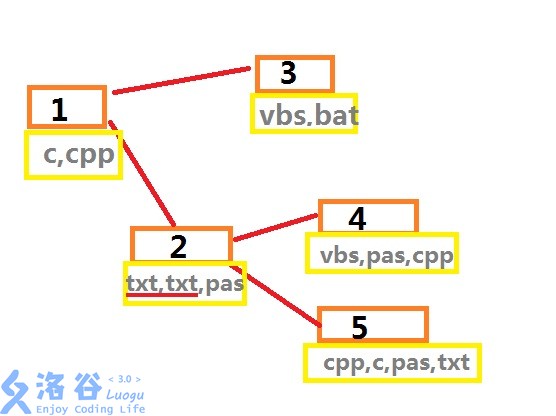
The figure shows the approximate structure of sample 1. Orange boxes are folders, gray text indicates file extensions, and red lines indicate mutual-access relationships between folders.
For the first operation: there are 3 txt files between folders 1 and 5, so output 3.
For the second operation: the distance between folders 1 and 4 is 2.
For the third operation: the deleted files are in folder 2, and there are 2 txt files, so output 2.
For the fourth operation: since the txt files in folder 2 were deleted, there is only 1 txt file between folders 1 and 5.
For the fifth operation: there are 2 vbs files between folders 3 and 4, so output 2.
Constraints:
For 30% of the testdata: .
For 50% of the testdata: .
For 70% of the testdata: .
For 90% of the testdata: .
For 100% of the testdata: , the total number of files is less than , file extensions are lowercase strings and are no longer than 6 characters.
Other notes:
-
About 50% of the testdata is generated completely at random.
-
Weakened version: PION Suffix Automaton (Weakened Testdata Version).
Translated by ChatGPT 5